Acknowledgements
This architecture documentation is based on arc42 - a great, freely available template for documenting software and system architectures.
Created, maintained and © by Dr. Peter Hruschka, Dr. Gernot Starke and contributors.

1. Introduction and Goals
Afunto is an open-source platform that connects engaged volunteers with regional needs. Volunteering and concrete societal benefit are always at the forefront.
The name is Low German: af un to means "now and then" - volunteering when it fits, without a standing commitment.
The platform follows three guiding principles:
-
Volunteering first: Every decision - whether a feature, an architectural choice, or a process - serves the goal of making voluntary engagement easier.
-
Simple code: The source code should be simple enough that anyone can contribute, even without deep prior knowledge.
-
No baggage: Maintaining the platform should not be a burden; it should remain a lightweight helper.
1.1. Requirements Overview
Volunteering doesn’t require a long-term commitment. Sometimes an afternoon is enough, sometimes a week. But finding out where help is currently needed is often difficult - whether at large NGOs or a local sports tournament. Existing platforms are too complex, too generic, or barely used.
Afunto solves this by making concrete needs visible: what is needed, where, and when.
Key functional requirements:
-
Organizations and clubs can post volunteer opportunities with location, timeframe, and the type of help needed (category and tags).
-
Volunteers can search for matching opportunities in their region and sign up.
-
Usage is possible without any long-term commitment.
| Goal | Description |
|---|---|
Strengthen volunteering |
Make voluntary engagement visible and accessible - without bureaucratic hurdles or long-term obligations. |
Open and sustainable |
The project is licensed under GNU AGPL v3.0. No profit, no closed source, no lost knowledge. It is secondary who develops the project further - the benefit to society comes first. |
Low entry barrier |
The entry barrier should be as low as possible for both users and contributors. |
1.2. Quality Goals
The following quality goals define the essential quality requirements for Afunto and serve as a guide for architectural decisions.
| Quality Attribute | Description | Weight |
|---|---|---|
Appropriateness |
Every feature directly serves volunteering. No feature-bloat, no over-engineering - only what concretely increases value for volunteers or organizations. |
Very High |
Simplicity |
Code and architecture are designed so that new contributors can understand them without deep prior knowledge. New features can be implemented without understanding the whole system. Simplicity takes precedence over flexibility. |
High |
Maintainability |
The platform can be operated and evolved with minimal effort. Dependencies and build processes work with standard tooling. Maintenance should be a matter of course, not a burden. |
High |
Usability |
The platform is intuitively usable. Volunteers and organizations can complete their tasks without onboarding or technical knowledge. |
High |
A complete list of all quality goals with detailed scenarios can be found in Chapter 10 Quality Requirements.
1.3. Stakeholders
| Role | Contact | Expectations |
|---|---|---|
Volunteers |
End users |
"I have a free Saturday afternoon and want to do something meaningful - but please without fighting through three forms first." Volunteer Vera expects an intuitive interface where she can quickly find suitable opportunities without registration hurdles or obligations. |
Organizations and clubs |
End users |
"We need ten people for setup this weekend. I want to post that in five minutes, not fifty." Organizer Olaf expects a simple way to post volunteer opportunities and reach volunteers without any technical knowledge. |
Platform admins |
End users (currently the maintainers) |
"If someone posts something abusive, I want it gone in two clicks - and I want to be able to prove afterwards what I did and why." Platform Admin expects a moderation queue over reported content, the ability to disable and restore accounts, organizations and listings, and an audit trail of every such action. The role is held by the maintainers today, but it is a separate role in the system rather than a maintenance chore. |
Contributors |
GitHub Issues and Pull Requests |
"I want to contribute a feature over a weekend, not spend two days just understanding the project." Contributor Caro expects simple, well-structured code, clear contribution guidelines, and documentation that makes getting started easy. |
Maintainers |
GitHub Repository |
"The less I have to fix at 2am, the better. Keep it simple, automate it, done." Maintainer Milo expects low maintenance overhead through simple architecture, automated CI/CD pipelines, and few external dependencies. |
2. Architecture Constraints
2.1. Technical Constraints
| Constraint | Rationale |
|---|---|
Docker required for local development |
The .NET Aspire AppHost provisions the local service containers (see Cross-cutting Concepts under Development and Build for the one-command orchestration), which requires Docker on every contributor machine. |
GNU AGPL v3.0 license |
All dependencies must be compatible with AGPL v3.0. Commercial or proprietary dependencies are excluded. Any modification of the platform offered over a network must be released under the same license. |
Self-hosted runtime - no US cloud dependencies for user data |
Keycloak, PostgreSQL, and object storage run self-hosted; no US-based cloud provider (AWS, Azure, Google Cloud) handles user data, ensuring data sovereignty and GDPR compliance. Source hosting, CI, and container image distribution use GitHub and GHCR. |
PlantUML for architecture diagrams |
All architecture diagrams are written as PlantUML source files and rendered via |
Generated API clients - |
Enforced by the OpenAPI-to-client generation pipeline - see Cross-cutting Concepts under Development and Build. |
AsciiDoc for documentation |
Architecture documentation follows the arc42 template written in AsciiDoc. Markdown is not used for structured documentation. |
2.2. Organizational Constraints
| Constraint | Rationale |
|---|---|
Open-source, volunteer-driven project |
All contributors are volunteers. Processes and tooling must respect that contributors have limited time. Complexity that requires hours of setup is unacceptable. |
Single maintainer (currently) |
The project is currently maintained by one person. Architectural decisions must minimize the operational and maintenance burden. Automation is preferred over manual processes. |
Minimal external service dependencies |
Every external service dependency is an operational responsibility. Dependencies are added only when they provide significant value that cannot be achieved with reasonable effort otherwise. |
Conventional Commits for all commits |
All commits follow the Conventional Commits specification ( |
2.3. Conventions
| Convention | Description |
|---|---|
Feature folder structure (backend) |
The backend organizes code by feature: |
API versioning via URL path |
All API routes include the version in the path ( |
Async all the way |
No |
English UI and code, multilingual support |
The user interface, end-user documentation, and all code, commits, issues, and pull requests are in English. The UI supports multiple languages via internationalization. |
ASCII-only formatting |
Plain ASCII hyphens only (no U+2013 en dash or U+2014 em dash) in source files; tab indentation per |
3. Context and Scope
3.1. Business Context
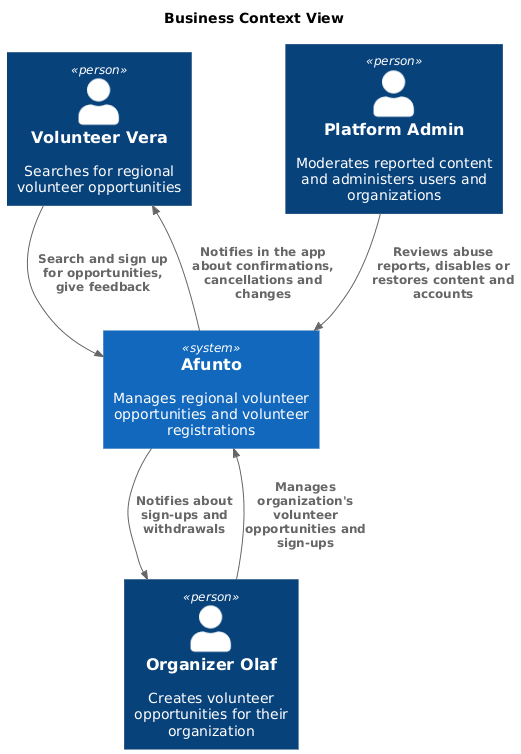
| Element | Description |
|---|---|
Volunteer Vera |
Searches for opportunities to volunteer regionally. Wants to find concrete needs quickly without long-term commitment. |
Organizer Olaf |
Creates and manages volunteer opportunities for their organization or club. Posts what help is needed, where, and when. |
Platform Admin |
Keeps the platform usable for the other two: works through abuse reports, disables or restores accounts, organizations and opportunities, and reads the audit trail of those actions. |
Afunto |
Connects volunteers with organizations by managing regional volunteer opportunities and registrations, and notifies both sides when something concerning them changes. |
3.2. Technical Context
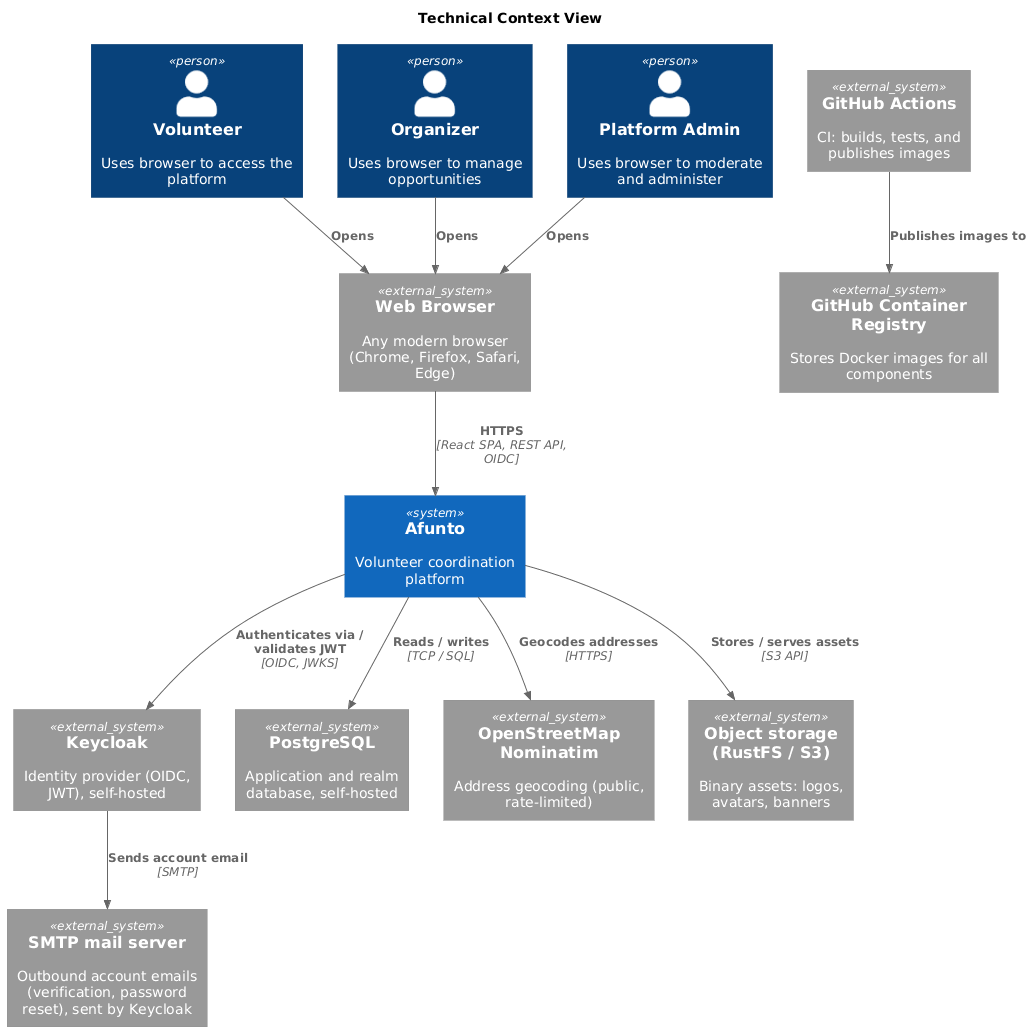
| Interface | Direction | Description |
|---|---|---|
Browser → Frontend |
Inbound |
Users access the platform via a modern web browser. The frontend is a React SPA served as static assets. |
Frontend → Backend API |
Outbound |
The SPA communicates with the backend via a versioned REST API over HTTPS. Authenticated requests carry a JWT Bearer token; public browsing (opportunity search and detail views) is anonymous. |
Frontend → Keycloak |
Outbound |
Authentication is handled via OIDC Authorization Code Flow with PKCE. The frontend redirects to Keycloak for login and receives tokens upon success. |
Backend → Keycloak |
Outbound |
The backend validates incoming JWT tokens by checking signatures against Keycloak’s public JWKS endpoint. |
Backend → PostgreSQL |
Outbound |
The backend persists structured application data (volunteer opportunities, organizations, engagements) in PostgreSQL via EF Core. Binary assets are stored in object storage, not the database. |
Backend → Nominatim (OpenStreetMap) |
Outbound |
The backend geocodes opportunity addresses via the public OpenStreetMap Nominatim service at write time (see ADR-4). The frontend’s city-autocomplete search ( |
Backend → OpenStreetMap tile server |
Outbound |
The backend proxies map tile requests ( |
Keycloak → SMTP mail server |
Outbound |
Keycloak sends its own account emails (address verification, password reset, administrator-requested actions) via SMTP: Mailpit locally, a real SMTP relay otherwise. The backend sends no email (ADR-15). |
Backend → Object storage (RustFS / S3) |
Outbound |
The backend stores binary assets (organization logos, user avatars, opportunity banners) in S3-compatible object storage. |
GitHub Actions → GHCR |
Outbound |
On a version tag ( |
| Business Interaction | Technical Realization |
|---|---|
Volunteer searches for opportunities |
|
Volunteer signs up for an opportunity |
|
Organizer creates a volunteer opportunity |
|
Organizer manages their opportunities |
|
Organizer invites a member to the organization |
|
Volunteer reports inappropriate content |
|
Admin works through the moderation queue |
|
Admin disables or restores an account or listing |
|
4. Solution Strategy
The following table summarizes the key architectural decisions and how they address the project’s quality goals.
| Quality Goal | Architectural Decision | Rationale |
|---|---|---|
Simplicity |
Clean Architecture with a flat, inward-pointing layer hierarchy (API → Application → Domain; Infrastructure → Domain) |
Clear separation of concerns without deep nesting. Each layer has a single, well-defined responsibility. New contributors can navigate the codebase without understanding the whole system. |
Simplicity |
CQRS via a lightweight in-house mediator (commands and queries as C# records) |
Each use case is encapsulated in one handler class. Finding the code for a feature means finding one file. No large service classes accumulating unrelated logic. |
Appropriateness |
Backend cut into functional modules, each with one folder per use case |
The backend’s |
Maintainability |
Generated API client for the frontend ( |
Prevents manual drift between the API definition and the client - see Cross-cutting Concepts under Development and Build. |
Maintainability |
Monorepo with centralized dependency management ( |
All NuGet package versions are managed in a single file. Version updates require one change, not many. |
Maintainability |
.NET Aspire AppHost for local development |
One command starts the entire local stack, so contributors need no manual setup of databases, Keycloak realms, or service dependencies - see Cross-cutting Concepts under Development and Build. |
Maintainability |
GitHub Actions CI → GHCR |
Builds and tests run automatically on every push and pull request to |
Usability |
Keycloak for authentication and authorization |
Volunteers and organizers get a polished login experience without the platform needing to implement authentication itself. Role-based access control ( |
Usability |
React 19 SPA with Tailwind CSS 4 |
Modern, responsive single-page application. Fast navigation without full page reloads. Tailwind enables consistent styling without large CSS frameworks. |
Open and sustainable (business goal) |
GNU AGPL v3.0 license |
Ensures all derivative works remain open source. Prevents the platform from being forked into a closed-source product. |
4.1. Technology Decisions at a Glance
| Component | Technology |
|---|---|
Backend framework |
.NET 10, ASP.NET Core Minimal API |
ORM |
EF Core 10 with PostgreSQL provider |
CQRS / Mediator |
Custom in-house mediator ( |
Authentication / Authorization |
Keycloak 26.7.4, OIDC, JWT Bearer |
Database |
PostgreSQL 18 |
Frontend framework |
React 19, Vite, TypeScript |
Styling |
Tailwind CSS 4 |
API client generation |
|
Local orchestration |
.NET Aspire AppHost (Docker for service containers) |
CI |
GitHub Actions → GitHub Container Registry (GHCR) |
Architecture documentation |
arc42, AsciiDoc, PlantUML |
5. Building Block View
The decomposition below uses one consistent cohesion criterion per level, named explicitly so a reader can tell whether a new piece of code belongs in an existing building block or needs a new one.
| Level | Cohesion criterion | Result |
|---|---|---|
1 |
Deployment and runtime boundary |
Four separately deployed containers. |
2 (Backend) |
Similar business function |
Twelve functional modules plus a shared kernel. |
2 (Frontend) |
Similar technology and implementation rules, then route area |
Artifact kinds (pages, components, hooks), with the organizer area separated by route. |
3 |
Refinement of one module |
The layer slice every backend module repeats. |
Level 3 is deliberately shown for one module only. The remaining eleven are built identically, which is documented once as the Module Structure concept rather than redrawn per module.
5.1. Level 1: System Overview (Whitebox)
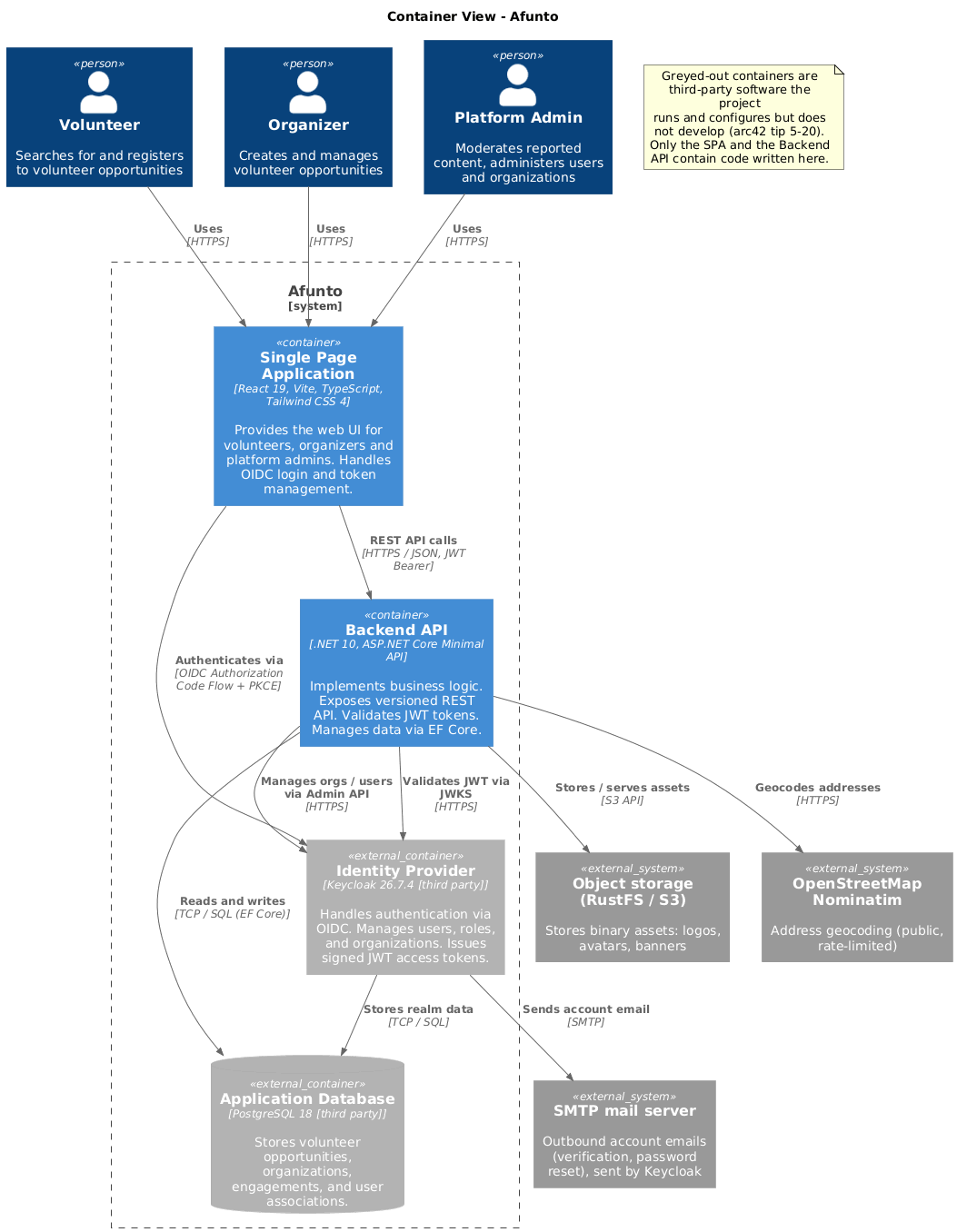
- Rationale for this decomposition
-
The split follows deployment boundaries, not business function: each of the four containers is built, versioned and shipped as its own artifact and can be restarted independently. Business function is the criterion one level down, inside the Backend API.
Two of the four containers are third-party software (greyed out in the diagram, arc42 tip 5-20). They appear in the building block view even though arc42 normally reserves it for self-written code, because authentication and persistence are delegated so completely that the remaining two containers cannot be understood without them - the Backend API implements no login logic at all. No code in this repository is compiled into them; the project contributes a realm configuration and an image build for Keycloak, and a schema plus migrations for PostgreSQL. In Context and Scope the same two appear as self-hosted neighbour systems, seen from outside the system boundary.
- Contained Building Blocks
| Container | Origin | Technology | Responsibility |
|---|---|---|---|
Single Page Application |
Written here |
React 19, Vite, TypeScript, Tailwind CSS 4 |
Provides the web UI for volunteers, organizers and platform admins. Handles OIDC login redirect and token storage. Communicates with the backend API using a generated client ( |
Backend API |
Written here |
.NET 10, ASP.NET Core, Clean Architecture |
Exposes the versioned REST API. Implements all business logic via CQRS handlers. Validates JWT tokens, enforces role-based authorization, persists data via EF Core. |
Identity Provider |
Third party |
Keycloak 26.7.4 |
Handles user authentication via OIDC Authorization Code Flow. Manages users, roles ( |
Application Database |
Third party |
PostgreSQL 18 |
Stores all application data: volunteer opportunities, organizations, engagements, and user associations. |
- Important Interfaces
-
The interfaces of the four Level-1 containers are consistent with, and not repeated from, the technical context’s External Interfaces table in Context and Scope, which remains the authoritative list. The one context interface without a Level-1 counterpart here is GitHub Actions to GHCR, which touches build artifacts rather than a running building block - see Deployment View.
5.2. Level 2: Backend API (Whitebox)
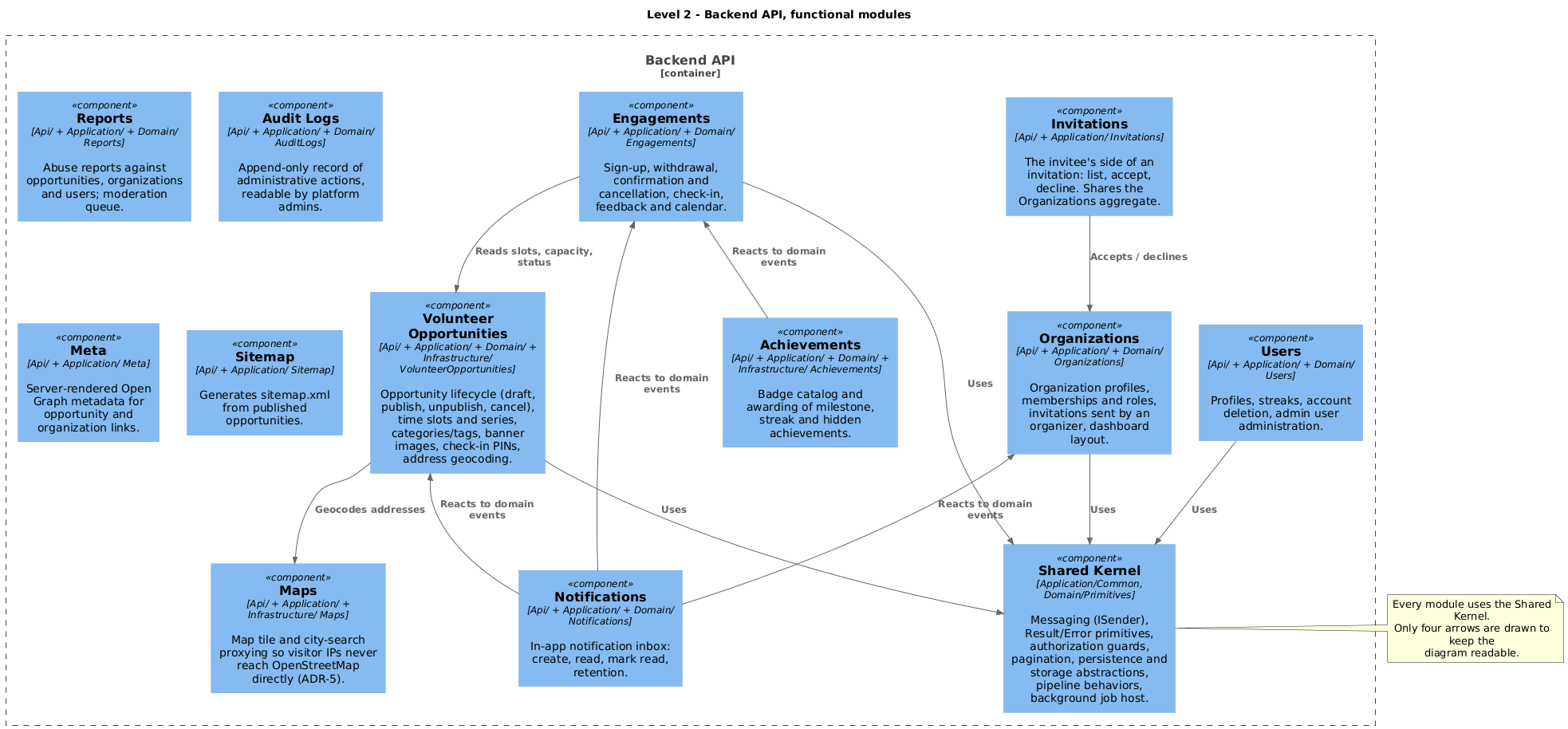
- Rationale for this decomposition
-
The modules are cut by business function, following the fact that a change request almost always arrives phrased as one ("organizers need to invite members", "volunteers should be able to withdraw"). The cut is carried through the layers that hold use cases and business rules:
Api/,Application/andDomain/each contain the same module folders, so a feature is one folder per layer rather than a diff spread across shared service classes.Infrastructure/is the deliberate exception - it is organized by adapted technology (Persistence/,Email/,Keycloak/,Storage/,Geocoding/,Maps/), because an adapter belongs to the external system it wraps, not to the module that happens to call it first. Only where an implementation is genuinely module-specific rather than technology-specific does a module folder reappear there (Infrastructure/Achievements/for the badge catalog,Infrastructure/VolunteerOpportunities/for PIN generation).
Two cuts are worth explaining because they do not follow entity ownership. Invitations is split from Organizations by actor rather than by aggregate: the organizer’s side (create, resend, dismiss) lives in Organizations, the invitee’s side (list, accept, decline) in Invitations, because the two are reached by different roles through different screens. Maps, Meta and Sitemap are thin modules with no aggregate of their own; they exist as modules because they are separately addressable capabilities with their own endpoints, not because they own domain state.
- Contained Building Blocks
| Module | Responsibility | Source location |
|---|---|---|
Volunteer Opportunities |
Opportunity lifecycle (draft, publish, unpublish, cancel), time slots including recurring series, categories and tags, banner images, check-in PINs, address geocoding. |
|
Engagements |
Sign-up and withdrawal, confirmation and cancellation by the organizer, check-in, feedback and calendar. |
|
Organizations |
Organization profiles, memberships and member roles, invitations from the organizer’s side, dashboard layout. |
|
Invitations |
The invitee’s side of an organization invitation: list, accept, decline. Operates on the Organizations aggregate. |
|
Users |
Profiles, streaks, account deletion, and the admin-facing user administration. |
|
Achievements |
Badge catalog and awarding of milestone, streak and hidden achievements. |
|
Notifications |
In-app notification inbox: creation from domain events, read state, deletion, retention. |
|
Reports |
Abuse reports against opportunities, organizations and users, and the moderation queue that resolves them. |
|
Audit Logs |
Append-only record of administrative actions, readable by platform admins. |
|
Maps |
Map tile and city-search proxying so visitor IP addresses never reach OpenStreetMap directly (ADR-5). |
|
Meta |
Server-rendered Open Graph metadata so shared opportunity and organization links preview correctly. |
|
Sitemap |
Generates |
|
Shared Kernel |
Cross-module infrastructure every module depends on: |
|
Modules communicate in one of two ways. Direct calls go inward through the shared kernel only for reads a use case cannot complete without (Engagements reads opportunity status and slot capacity). Everything reactive - notifications, achievements - runs off domain events raised by the aggregate and dispatched after commit, so the module that causes an event never references the modules that react to it.
5.3. Level 3: Inside a Module (Whitebox, example)
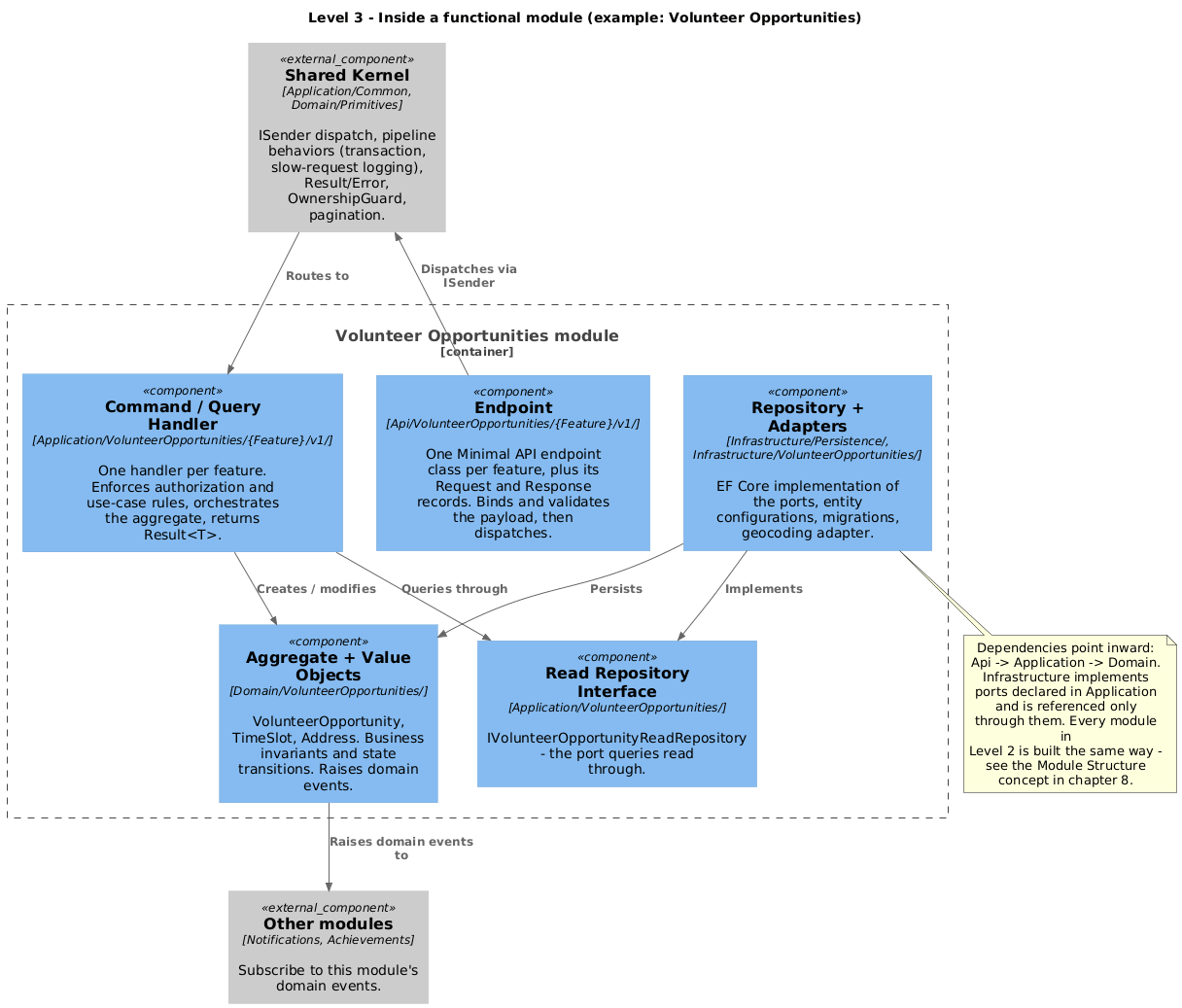
- Rationale for this decomposition
-
Every functional module from Level 2 repeats the same internal shape, so only one is drawn (arc42 tip 5-27: refine only a few building blocks). The shape itself - Clean Architecture layering plus one folder per use case - is a cross-cutting concept and is described once in Cross-cutting Concepts under Module Structure, rather than repeated as a whitebox for each of the twelve modules.
| Element | Responsibility | Source location |
|---|---|---|
Endpoint |
One Minimal API endpoint class per feature, with its |
|
Command / Query Handler |
One handler per feature. Enforces use-case rules and ownership, orchestrates the aggregate, returns |
|
Aggregate and Value Objects |
|
|
Read Repository Interface |
|
|
Repository and Adapters |
EF Core implementation of the ports, entity configurations, migrations, and the geocoding adapter. |
|
5.4. Level 2: Frontend SPA (Whitebox)
- Rationale for this decomposition
-
The frontend is cut by artifact kind rather than by business function - the opposite of the backend. A React page composes shared components, hooks and helpers that are reused across unrelated domains (a modal, a date formatter, the toast bus), so grouping by domain would leave most files in a shared bucket anyway. The one functional split that does exist is by route area: everything an organizer reaches under
/applives inpages/app/, because that area has its own layout, navigation and authorization gate.
This asymmetry with the backend is deliberate, but it is an asymmetry: a feature that spans both ends is one folder per layer in the backend and a scattering of files in the frontend. It is the main reason a contributor’s first change tends to take longer on the frontend side.
| Element | Responsibility | Source location |
|---|---|---|
Pages |
Top-level route components, one per route. Public and volunteer-facing pages sit at the root; organizer pages are grouped under |
|
Components |
Reusable UI building blocks - stateless or locally stateful, styled with Tailwind CSS. Includes the domain-flavoured ones ( |
|
API Client |
TypeScript client generated from the backend’s OpenAPI document by |
|
Layouts |
App shells ( |
|
Contexts and Hooks |
Global UI state ( |
|
Helpers |
Framework-free logic with unit tests alongside: formatting, status mapping, geo and colour maths, form schemas. |
|
5.5. Source Code Mapping
The building block structure maps directly onto the directory structure, so no separate mapping table is needed beyond the source locations given above:
-
Level 1 containers map to the top-level directories
frontend/andbackend/src/Api|Application|Domain|Infrastructure/, pluskeycloak/for the Keycloak image and realm. -
Level 2 backend modules map to identically named folders repeated inside
Api/,Application/andDomain/. -
Level 3 features map to
{Feature}/v1/folders inside a module.
Three parts of the repository sit outside that scheme and are named here so no shipped code is left unaccounted for:
-
backend/src/Aspire/ServiceDefaults/is compiled into the Backend API and belongs to the Shared Kernel. It contributes the OpenTelemetry, health-check and service-discovery defaults described in Cross-cutting Concepts. -
backend/src/Aspire/AppHost/is local orchestration only and is never part of a released image - see Deployment View. -
backend/tests/andfrontend/test files carry no building block of their own; they are covered by the testing approach in Cross-cutting Concepts.
6. Runtime View
The following three scenarios cover the platform’s most representative flows: signing in, browsing opportunities (the main volunteer read path), and creating an opportunity (the main organizer write path). They are deliberately few - arc42 advises documenting only the scenarios that are architecturally revealing. The Platform Admin flows from Context and Scope are not drawn here because they follow the same request path as the organizer scenario, differing only in the role the endpoint requires.
6.1. User Login (OIDC Authorization Code Flow)
A volunteer or organizer opens the application and authenticates via Keycloak using the OIDC Authorization Code Flow with PKCE.
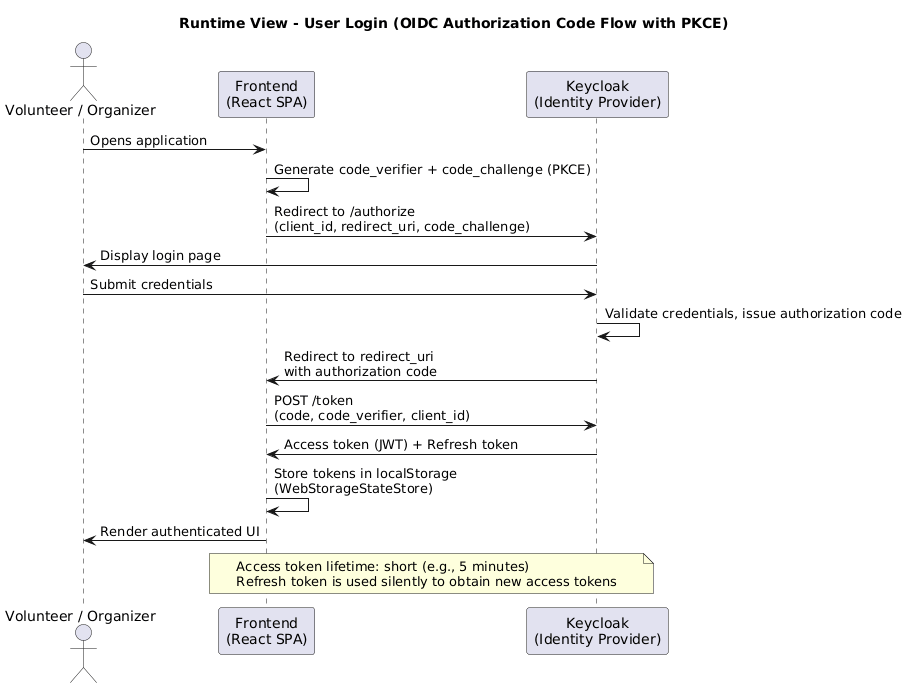
Key aspects of this flow (see Cross-cutting Concepts under Authentication and Authorization for why this is fully delegated to Keycloak):
-
PKCE prevents authorization code interception attacks in the public client (SPA).
-
Tokens are persisted in
localStoragevia the OIDC client’sWebStorageStateStore, so a page reload keeps the session (and end-to-end tests can capture it). -
The access token is a short-lived JWT; the refresh token is used to obtain new access tokens silently.
6.2. Browse Volunteer Opportunities
A volunteer opens the opportunities page. The frontend fetches the list from the backend API, which queries PostgreSQL. Browsing opportunities is a public, anonymous read - no token is required.
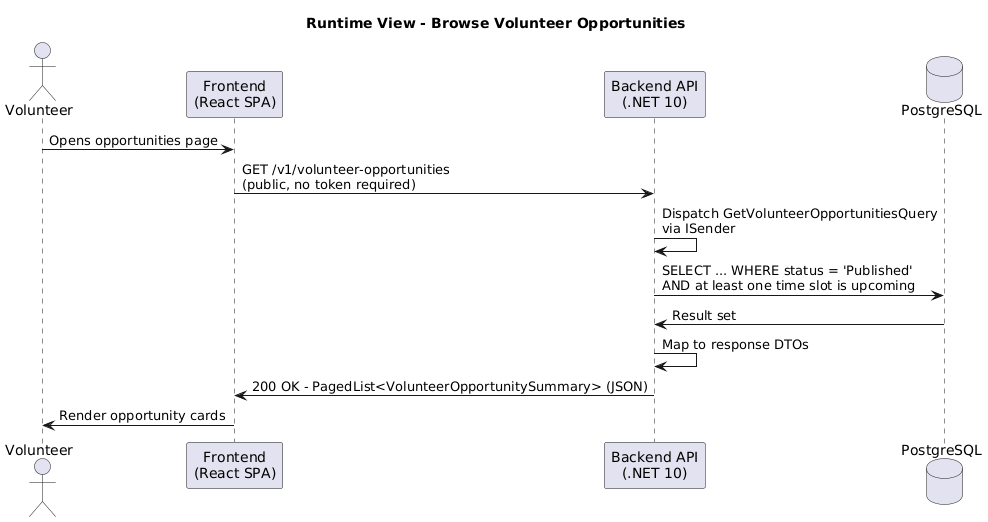
Key aspects:
-
Browsing opportunities is public: the list and detail endpoints allow anonymous access, so no token is required for this flow.
-
Authenticated endpoints (for example creating an opportunity or signing up) validate the JWT signature using Keycloak’s public JWKS keys, cached locally.
-
No session state is held server-side - the backend is stateless.
6.3. Create Volunteer Opportunity
An organizer fills out the opportunity form and submits it. The backend validates the JWT, checks the organisator role, geocodes the address, and persists the new opportunity.
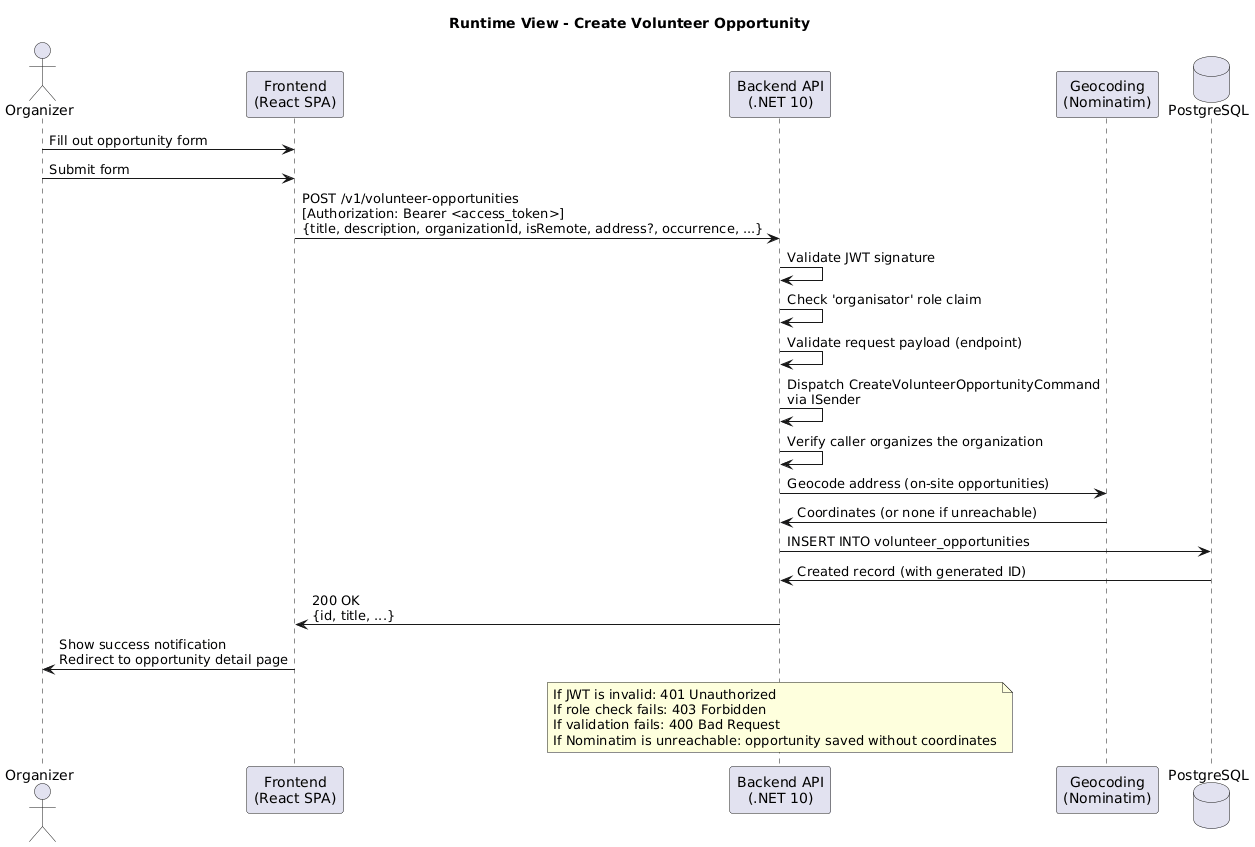
Key aspects:
-
Role authorization (
organisator) is enforced declaratively at the endpoint; the command handler additionally verifies that the caller organizes the target organization. -
Request-payload validation happens in the API endpoint before the command is dispatched via
ISender; the handler then enforces domain invariants. -
For on-site opportunities the handler geocodes the address synchronously via Nominatim (see ADR-4); if Nominatim is unreachable the opportunity is still saved, without coordinates, and appears in the list but not on the map.
-
The response includes the created opportunity’s ID so the frontend can redirect to the detail page.
7. Deployment View
Afunto runs in two shapes: the local developer stack, orchestrated by .NET Aspire from source, and the deployed runtime, where the same building blocks run as released container images.
This chapter describes both and which building blocks run where. How and where the deployed runtime is actually hosted, provisioned and operated is out of scope for this repository - this repository builds and publishes the images, and nothing more (see "Image Publishing" below).
7.1. Infrastructure Level 1
7.1.1. Local Development (.NET Aspire)
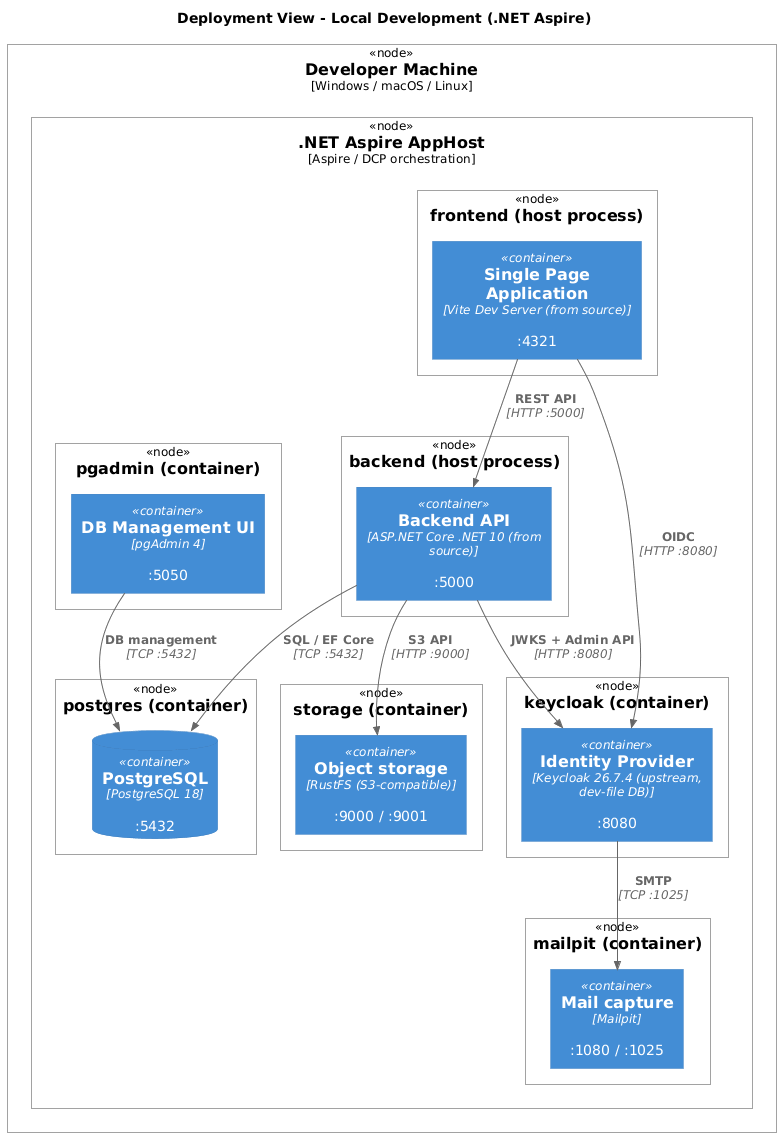
- Motivation
-
The entire stack runs locally via the .NET Aspire AppHost - see Cross-cutting Concepts under Development and Build for the one-command orchestration this relies on. Running everything from one command ensures environment parity across all contributor machines and eliminates manual setup of databases, Keycloak, or service dependencies.
- Quality and Performance Characteristics
-
Local development is optimized for fast iteration. All services run on
localhostwith no TLS. Keycloak runs the upstream image with a dev-file database and a relaxed, auto-imported realm; the backend and frontend run from source with hot reload.
| Building block (Level 1) | Node | Artifact |
|---|---|---|
Single Page Application |
Developer machine |
Vite dev server from source, port 4321 |
Backend API |
Developer machine |
|
Identity Provider |
Docker container |
|
Application Database |
Docker container |
|
backend/src/Aspire/AppHost is the orchestrator itself and is the one project that exists only here - it is never part of a released artifact.
| Service | Image / Source | Port | Notes |
|---|---|---|---|
pgAdmin |
|
5050 |
Pre-configured server connection to PostgreSQL |
Mailpit |
|
1080 / 1025 |
Captures the emails Keycloak sends (web UI on 1080, SMTP on 1025) |
RustFS |
|
9000 / 9001 |
S3-compatible object storage (API on 9000, console on 9001) |
7.1.2. Deployed Runtime
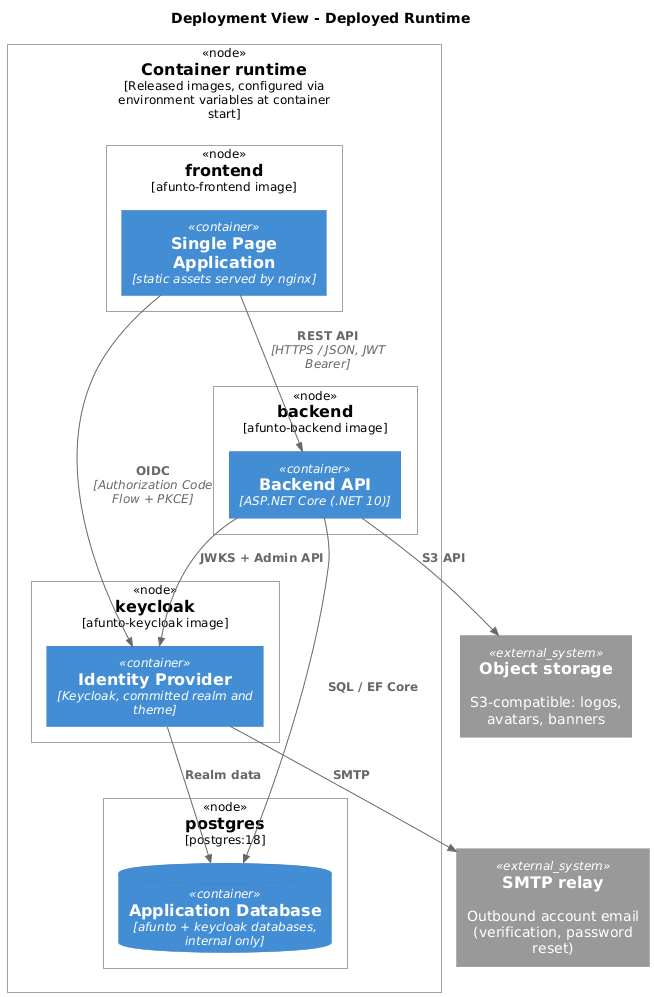
- Motivation
-
Away from a developer machine, the three building blocks this repository builds run as the release images described under "Image Publishing" below, against the same service types the local stack fakes: a PostgreSQL server, S3-compatible object storage, and an SMTP relay. Each image is configured entirely through environment variables at container start, so one build runs anywhere without a rebuild - the frontend image in particular resolves its API, Keycloak and storage origins at startup rather than at build time (see
frontend/AGENTS.md). - Quality and Performance Characteristics
-
Container images are the release artifacts, pulled by tag from GHCR. The backend applies EF Core migrations on startup when
Database:MigrateOnStartupis enabled. The Application Database publishes no public route and is reachable only from within the runtime’s own internal network; the Backend API is the only building block that talks to every other one, which is why an authentication gap there has the widest blast radius and why it validates every JWT against Keycloak’s JWKS.
| Building block (Level 1) | Artifact | Notes |
|---|---|---|
Single Page Application |
|
Static SPA assets served by nginx; origins substituted at container start |
Backend API |
|
Migrates on startup when enabled |
Identity Provider |
|
Custom image with the committed realm and theme; PostgreSQL-backed |
Application Database |
|
Two databases: |
| Service | Notes |
|---|---|
Object storage |
S3-compatible; holds organization logos, user avatars and opportunity banners. The backend authenticates with a bucket-scoped service account rather than root credentials (#1353) |
SMTP relay |
Outbound account email, sent by Keycloak only (verification, password reset) |
OpenStreetMap Nominatim |
Address geocoding at write time and city-autocomplete search, both proxied through the backend so the frontend never calls it directly (ADR-4, ADR-5) |
OpenStreetMap tile server |
Map tiles, proxied through the backend and cached in-process for 24h so the frontend never calls it directly (ADR-5) |
The exact environment variables the backend and frontend images accept - which are required versus optional, their defaults, and how they map to the services above - is documented as the operator-facing contract for this deployment shape, not repeated here: README.md’s "Running the Released Images" section, modelled on the Keycloak image’s own contract (keycloak/README.md).
7.1.3. CI/CD Pipeline
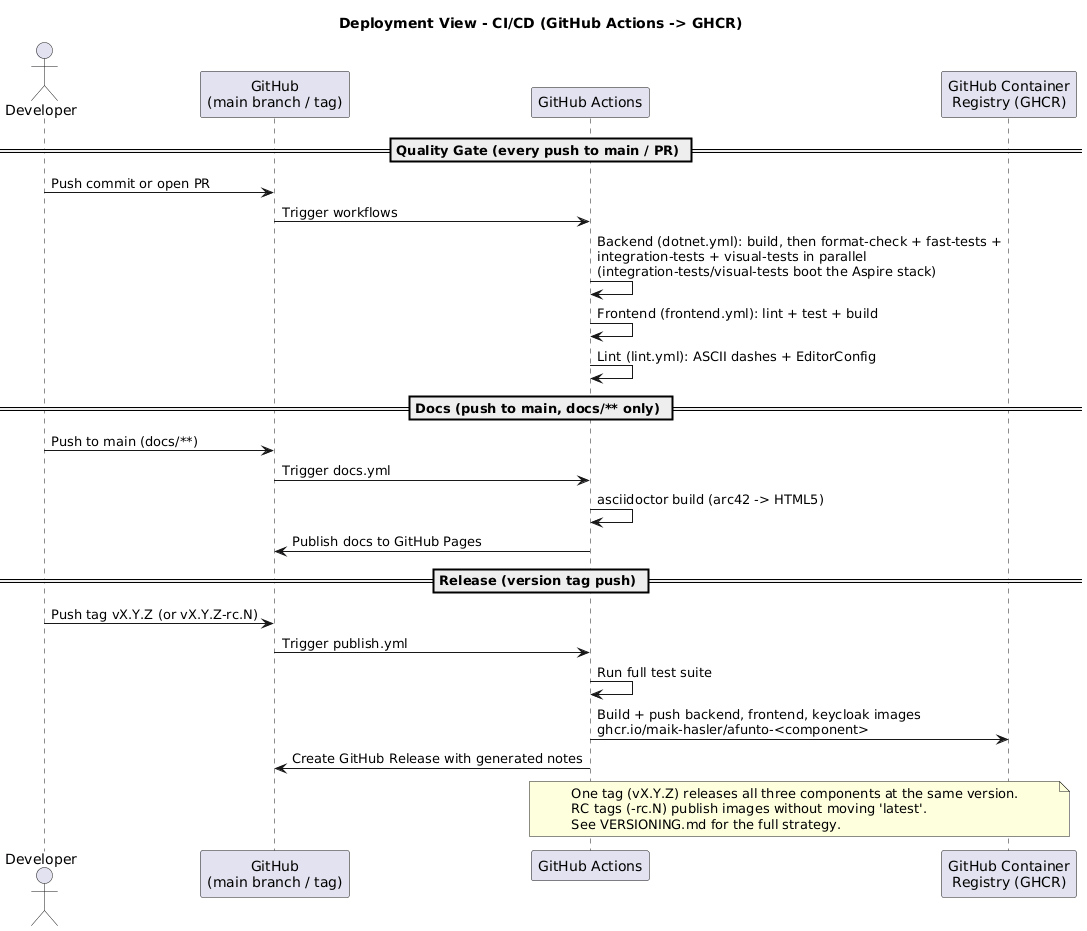
The CI/CD pipeline runs on GitHub Actions and covers three concerns: quality gates on every change, docs publishing, and release-time image publishing. This environment builds and verifies the building blocks rather than serving them, so there is no building-block-to-node mapping for it; the artifacts it produces are the images described above.
Quality Gate (on every push / PR to main)
The backend workflow (dotnet.yml) runs a build job (dotnet restore + dotnet build for the whole solution) that format-check, fast-tests, integration-tests, and visual-tests all depend on via needs: build, each downloading that build artifact instead of building its own copy:
-
format-check- verifiesdotnet format. -
fast-tests-Application.UnitTestsandArchitectureTests, no containers. -
integration-testsandvisual-tests- both boot the Aspire AppHost stack (the same stack as local development) under Docker;visual-testsadds Playwright end-to-end checks.
The frontend workflow (frontend.yml) runs lint, i18n key-parity, type-check, and build; lint.yml enforces ASCII dashes and EditorConfig. `dotnet.yml’s critical path is kept bounded and is actively tracked as the test suite grows - see TDR-2 for current timing data.
The architecture docs build (docs.yml) also builds on every pull request touching docs/**, as a build-only check - GitHub Pages publishing stays gated to pushes on main, so a docs PR can never publish a preview.
Image Publishing (on tag push)
Images are published to GitHub Container Registry (GHCR) on version tag pushes. A single Git tag releases all components at the same version:
| Component | Tag format | Example |
|---|---|---|
Frontend |
|
|
Backend |
|
|
Keycloak |
|
|
Release candidate tags (v{semver}-rc.N) publish images without moving the latest tag; stable tags (no -rc suffix) publish images and move latest. publish.yml stops there - what consumes a published tag, and where, is outside this repository. See VERSIONING.md for the full versioning and publishing strategy.
8. Cross-cutting Concepts
The concepts below are grouped the way arc42 suggests: what the system is about, how it is structured, how it is secured, what happens under the hood, how it is developed, and how it is operated. Term definitions are not repeated here - they live in Glossary.
8.1. Domain Model
The domain model is the vocabulary the rest of this document uses. It is referenced by every module in Building Block View and by the runtime scenarios in Runtime View.
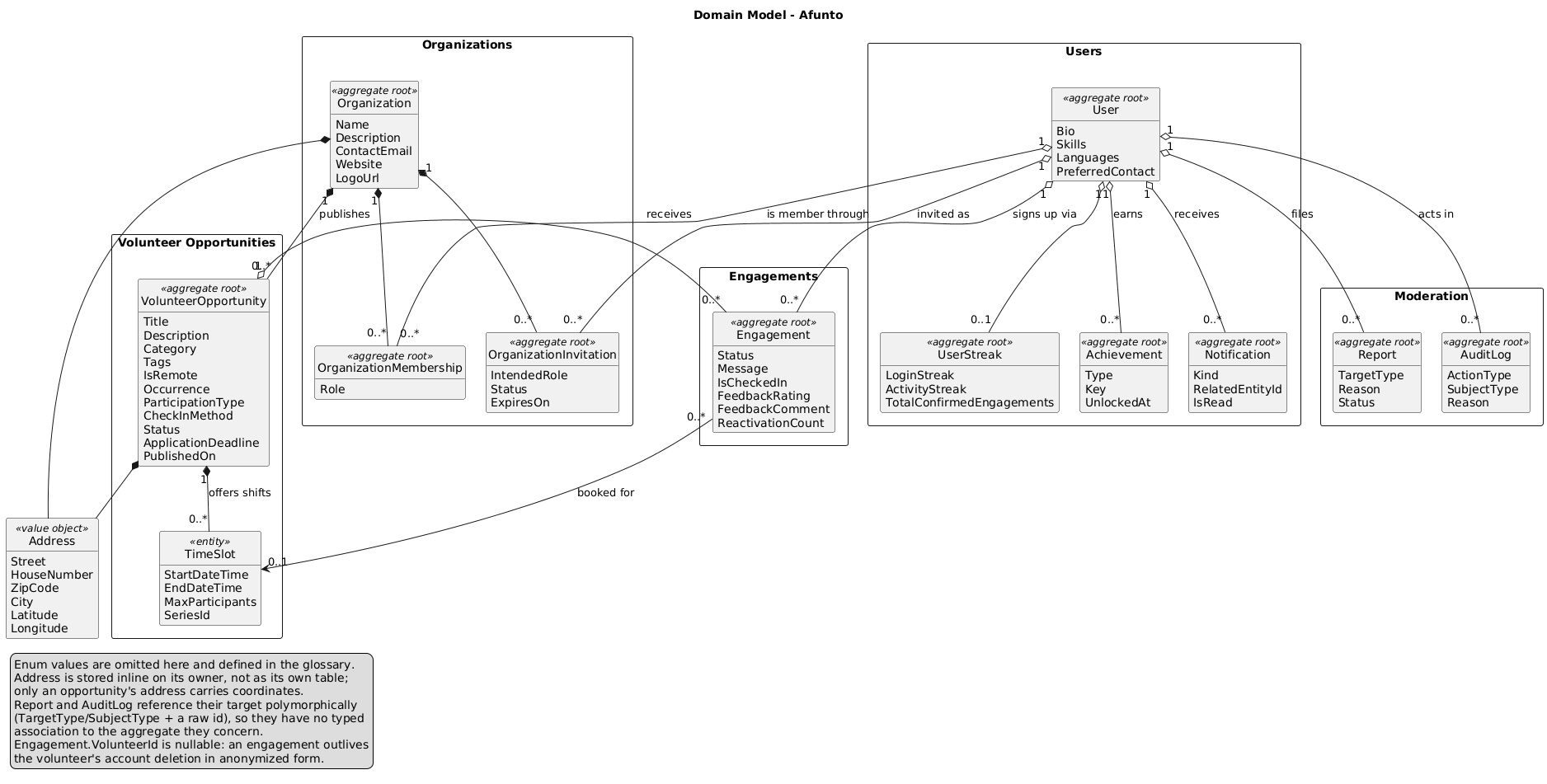
An Organization publishes Volunteer Opportunities. An opportunity is the central aggregate: it says what help is needed, where, and when. It is either a ScheduledSlots opportunity, which carries one or more Time Slots that volunteers book, or an IndividualContact opportunity, which carries an application deadline instead and is arranged directly with the organizer. A recurring opportunity generates several time slots sharing a SeriesId so they can later be edited or cancelled together.
A volunteer signing up creates an Engagement, linking a User, an opportunity and (for scheduled opportunities) one time slot - see Glossary for its full lifecycle.
Two modelling decisions are worth stating because they are not obvious from the diagram:
-
An engagement’s
VolunteerIdis nullable. When a user deletes their account, their engagements are anonymized instead of removed, so an organizer’s past participant counts stay correct and the opportunity’s history is not silently rewritten. -
Report and Audit Log reference what they concern polymorphically, through a
TargetType/SubjectTypeenum plus a rawGuid. Moderation has to be able to point at any aggregate, and a typed foreign key per target type would either couple the moderation module to every other module or force a join table per type.
Membership in an organization is its own aggregate, not a field on either side: Organization Membership holds the pair plus the member’s role, and Organization Invitation holds a pending offer to create one. The local membership table, not the JWT, is the request-time source of truth for organizer access - see Authentication and Authorization below.
The remaining aggregates hang off User and exist to support engagement rather than to record it: Achievements (badges), User Streak (login and activity counters), and Notification (the in-app inbox).
8.2. Module Structure
Every functional module in Building Block View is built the same way. Documenting the shape once here is what allows Level 3 of the building block view to show a single example instead of twelve near-identical whiteboxes.
Clean Architecture layering. Dependencies point inward only: Api to Application to Domain. Infrastructure implements ports declared in Application and is referenced only through them, so the domain and use cases compile without EF Core, Keycloak or any HTTP client. The rule is enforced by backend/tests/ArchitectureTests, not just by convention.
One folder per use case. Each feature lives in {Layer}/{Domain}/{Feature}/v1/ and consists of the request record, the handler, and the response record. Finding the code for a feature means finding one folder per layer; adding a feature means adding folders rather than editing shared service classes.
CQRS. Use cases are split into commands and queries, dispatched through a small in-house mediator (ISender, no external library) with reflection-registered handlers. Two pipeline behaviors wrap every command: one opens a database transaction, the other logs slow requests.
-
Queries are read-only. They use dedicated read repository interfaces (
IVolunteerOpportunityReadRepository) and may use projections without loading full aggregate state. -
Commands change state. They return only what is needed (typically the new entity’s ID) and enforce business rules before writing.
Domain events for cross-module reactions. An aggregate raises domain events; they are dispatched after commit through the outbox. Notifications, achievements and emails are produced by handlers subscribing to those events, so the module that causes something never references the modules that react to it. This is what keeps Volunteer Opportunities free of any mention of Notifications.
Result instead of exceptions. Domain and application logic signal failure with Result / Result<T> carrying an Error, not by throwing. See Error Handling below for how that reaches the client.
8.3. Authentication and Authorization
Authentication and authorization are fully delegated to Keycloak. The application itself does not implement login, password management, or session handling.
Authentication flow (OIDC Authorization Code Flow with PKCE):
-
The frontend redirects the browser to Keycloak’s authorization endpoint with a
code_challenge. -
The user authenticates at Keycloak (username/password or SSO).
-
Keycloak redirects back to the frontend with an authorization
code. -
The frontend exchanges the
code+code_verifierfor an access token and refresh token. -
All subsequent API requests include the access token as a JWT Bearer token.
Authorization:
Role-based access control is enforced at the API endpoint level using ASP.NET Core authorization policies. Roles are embedded in the JWT as claims and originate from Keycloak.
| Role | Permissions |
|---|---|
|
Browse volunteer opportunities, register for opportunities |
|
All |
|
Full administrative access: moderation queue, user and organization administration, audit log |
Per-organization membership:
The organisator role in the JWT only proves the user organizes some organization, not which one. "Own organization" access is gated by a separate, local organization_membership table (organization_id, user_id, role), not by anything in the token. OwnershipGuard.EnsureIsOrganizerAsync checks this table on every org-modifying endpoint and returns 403 Forbidden (Organization.NotOrganizer) when the requesting user has no membership row for that organization. There is no Keycloak fallback at request time - Keycloak is the source of truth for who organizes an organization, but the request-time guard only ever reads the local table.
Membership rows are written when a user is added to an organization, and once at startup by an idempotent backfill that pulls existing organizer members from Keycloak for any organization that predates the table and has no membership rows yet. The backfill runs after migrations on every startup path, so starting against pre-existing data does not lock out its existing organizers.
Permission changes take effect on the next request:
Roles in an access token are fixed at issue time, so a token would otherwise keep a revoked role, or lack a granted one, until it expires. Granting or revoking admin, blocking or unblocking an account, and every grant or revocation of the organisator realm role (promoting a member, or demoting or removing one who then organizes no organization) each stamp the target’s local user.permissions_changed_on. The JWT bearer handler’s OnTokenValidated event (PermissionsChangedTokenValidator) compares that stamp with the token’s iat and answers 401 for any token issued in a second before the change. A token from the same second counts as fresh: iat cannot order it against the change, and rejecting it would also reject the renewal fetched right after the 401, ending the session. Such a token, if it predates the change, keeps the old roles until it expires. The frontend’s API client reacts to that 401 by renewing the token silently and resending the request once; the new token carries the current roles, and a blocked user gets none, so their session ends. Organization-scoped access never depended on the stamp: the membership guard above reads the local table on every request, so the stamp only brings the token’s roles, and with them the UI, up to date. Changes made directly in the Keycloak admin console bypass the stamp and still wait for token expiry.
Token handling in the frontend:
Access and refresh tokens are stored in localStorage via the OIDC client’s WebStorageStateStore, so the session survives a page reload. The refresh token is used to obtain new access tokens silently when the access token expires.
8.4. Error Handling
Error handling follows a consistent pattern across the stack:
Backend:
Domain and application logic signal failure with a Result / Result<T> type (Error.Validation / NotFound / Conflict / Forbidden) rather than exceptions. At the application boundary a failed result becomes a ResultFailureException, mapped to an RFC 7807 ProblemDetails response carrying errorCode and traceId:
-
Validation errors →
400 Bad Request. -
Not-found cases →
404 Not Found. -
Conflicts →
409 Conflict. -
Authorization failures →
401 Unauthorizedor403 Forbidden. -
Rate-limited requests →
429 Too Many Requests(see Rate Limiting below). -
Unhandled exceptions are caught by a global exception handler and returned as
500 Internal Server Errorwith the OpenTelemetry trace ID (also sent as theX-Trace-Idresponse header) - no stack traces leak to clients.
Frontend:
-
API errors are surfaced to the user via inline error messages, not generic alerts.
-
Network errors (offline, timeout) are handled gracefully with retry options where appropriate.
-
The generated client rejects with the backend’s
ProblemDetails, carrying its HTTP status code.
8.5. Rate Limiting
All endpoints are rate-limited using ASP.NET Core’s built-in rate limiter, with separate fixed-window policies for reads and writes partitioned by authenticated user or client IP - see TDR-1 for the exact limits and implementation.
8.6. Database Migrations
Database schema changes are managed via EF Core migrations.
-
Migrations are stored under
backend/src/Infrastructure/Persistence/Migrations/. -
In Development the application applies pending migrations automatically on startup; in other environments it does so only when
Database:MigrateOnStartupis enabled, otherwise the schema is applied out of band (dotnet ef database update). -
Migration files are committed to the repository alongside the code changes that require them.
-
Expand/contract, no destructive change within a single release. Rolling back a release swaps the running container images back to the previous version but does not undo any migration that already applied - the schema stays exactly where the rolled-back release left it. A migration that drops or renames a column or table, or tightens a constraint (adding
NOT NULL, narrowing a type), leaves the old image with no matching schema to fall back to, turning a rollback into a crash loop rather than a fix. A rename is just as destructive here as a drop: the old name stops existing in the same statement that the new one appears, so a rolled-back old image finds neither. Split a change like that across two releases instead: expand first, adding the new column/table so both the old and new code paths keep working against the schema unchanged, then contract later, dropping what nothing reads any more, only once the expand release has shipped. Purely additive migrations - a new nullable column, table, or index - stay backward-compatible on their own and do not need to be split.
8.7. API Versioning
All API routes include the version in the URL path: /v{version}/….
-
The current version is
v1. -
Breaking changes (removed fields, changed semantics, renamed endpoints) require a new version.
-
Non-breaking additions (new optional fields, new endpoints) can be added to the existing version.
-
The generated client is regenerated after any API change to keep the frontend in sync (
pnpm client:generate; the backend build does not do it, see below).
8.8. Internationalization (i18n)
The user interface is translated with i18next (react-i18next), backed by resource bundles under frontend/src/locales/ (en.json, de.json). The active language is resolved from the user’s Keycloak profile locale on sign-in, then from localStorage, then from the browser. Domain content is not localized beyond the optional English title and description of an opportunity. CI enforces en / de key parity.
8.9. Email
The backend sends no email (ADR-15). Every message to a user is a notification in the in-app bell, created synchronously by the command handler that caused it (Notification, NotificationKind).
The only emails are Keycloak’s own: address verification, password reset, an administrator’s "required actions" email and the confirmation of an address change. They are sent through the realm’s SMTP settings (KC_SMTP_*) and styled by the realm’s afunto email theme, which lives in keycloak/themes/afunto/email/ with German and English copy (see keycloak/AGENTS.md).
8.10. Geocoding and Geo-Search
Opportunity addresses are geocoded at write time, and spatial search uses a bounding-box prefilter plus in-memory Haversine refinement (no PostGIS). This concept is documented in full as an architecture decision - see ADR-4. Map tiles and city autocomplete are proxied through the backend rather than called from the browser, so visitor IP addresses are never sent to OpenStreetMap - see ADR-5.
8.11. Testing
Tests are organized by what they need to run, which is also how CI parallelizes them (see Deployment View):
-
Application.UnitTestsandArchitectureTestsneed no containers. The architecture tests (NetArchTest) enforce the Clean Architecture layer rules and the naming conventions described under Module Structure, so a violation fails the build rather than waiting for review. -
IntegrationTestsboot the Aspire AppHost stack under Docker and reset state between tests with Respawn. -
VisualTestsadd Playwright end-to-end checks against the same stack, and are also where accessibility assertions live. -
Frontend helper logic under
frontend/src/lib/carries unit tests alongside the implementation.
8.12. Development and Build
-
Local orchestration. One command (
dotnet run --project backend/src/Aspire/AppHost) provisions PostgreSQL, pgAdmin, Keycloak, RustFS and Mailpit as containers and runs the backend and frontend from source. Contributors do not set up services by hand. -
Generated API client.
frontend/src/client/generated/is generated by@hey-api/openapi-tsfrom the backend’s OpenAPI document and is never hand-edited; a change to an endpoint or DTO requires regenerating it withpnpm client:generate. The backend build regenerates the document itself and the integration tests' C# client (NSwag), but not this one -pnpm check:client-currentis what catches the difference. -
Dependency management. NuGet versions are centralized in
Directory.Packages.props; Renovate opens update pull requests. -
Release artifacts. Frontend, backend and Keycloak images are built and published together under a single version tag - see Deployment View and
VERSIONING.md.
8.13. Logging and Observability
The backend uses the .NET built-in ILogger<T> abstraction. Console output is structured JSON (Logging:Console:FormatterName in appsettings.json), not freeform text, so every log line is machine-parseable straight off stdout with no collector required in front of it.
The trace ID reaches log entries two ways, because HTTP request logging and the rest of the pipeline run at different points relative to authentication: an IHttpLoggingInterceptor stamps it directly onto the built-in HTTP request-summary log as it’s produced, while a logging scope wrapping everything downstream of authentication enriches endpoint and background-job log entries with both the trace ID and the authenticated user ID (surfaced as a Scopes array in the JSON via IncludeScopes). Between the two, an operator reading stdout can correlate every log line for a request, not only the ones an exception handler happens to log.
Metrics (ASP.NET Core, HTTP client, runtime) and distributed traces have no such fallback - they exist only via OpenTelemetry (the Aspire service defaults in backend/src/Aspire/ServiceDefaults/), exported over OTLP and collected by the Aspire dashboard in local development. Outside of that, the exporter stays inert unless OTEL_EXPORTER_OTLP_ENDPOINT names a collector - which today is everywhere the images are actually deployed, now that #2165 removed the only stack in this repository that ran one. Point that variable at an OTLP collector (e.g. an OpenTelemetry Collector or Grafana Alloy instance) to get metrics and traces in a deployed environment; logs need nothing extra - they are always on stdout for the container runtime’s own log driver to collect.
Key logged events:
-
HTTP request logs (method, path, status, duration, trace ID) - the
Microsoft.AspNetCore.HttpLoggingcategory has its ownLogLeveloverride so these survive the broaderMicrosoft.AspNetCore: Warningfilter (#1352) -
Unhandled exceptions (with trace ID)
-
Slow requests (flagged by the performance pipeline behavior)
8.14. Operations
Data retention. Read notifications are pruned relative to when they were read rather than when they were created, and abuse reports concerning a deleted account are pruned from the point that account was deleted (#1725). Both run as scheduled background jobs.
Health endpoints. The backend exposes /alive (process liveness) and /health (readiness, including its dependencies). Both are anonymous and rate-limited, and are what a container runtime polls to decide whether an instance is ready to serve traffic.
9. Architecture Decisions
The following table lists the relevant architecture decisions. Each decision links to the corresponding ADR with full context, rationale, and considered alternatives.
| No. | Context | Description | Status | Date | ADR |
|---|---|---|---|---|---|
1 |
Monorepo |
Manage all components in a single repository. |
Accepted |
2026-03-23 |
|
2 |
arc42 |
Use arc42 as the template for architecture documentation. |
Accepted |
2026-03-25 |
|
3 |
Keycloak |
Use Keycloak as the Identity and Access Management solution. |
Accepted |
2026-03-25 |
|
4 |
Geocoding |
Geocode addresses at write time via Nominatim; spatial filtering by bounding box plus in-memory Haversine (no PostGIS). |
Accepted |
2026-05-13 |
|
5 |
Map/geocoding proxying |
Proxy OpenStreetMap tile and Nominatim requests through the backend so visitor IP addresses are never sent to these third parties directly. |
Accepted |
2026-07-27 |
|
6 |
Light-only theme |
Stay light-only for now; |
Accepted |
2026-08-25 |
|
7 |
Repository scope |
Stop this repository’s scope at building and publishing container images; deployment, staging/production and observability now live in a separate private repository. |
Accepted |
2026-08-22 |
|
8 |
Distributed tracing (historical) |
Add Grafana Tempo tracing to the (since-removed) deployed observability stack. Originally ADR-6; restored 2026-08-26 after being deleted instead of superseded - see ADR-7. |
Superseded by ADR-7 |
2026-07-29 |
|
9 |
Server state |
Hold server state in a TanStack Query cache instead of per-component |
Accepted |
2026-09-21 |
|
10 |
Frontend API client |
Generate the frontend’s TypeScript client with |
Accepted |
2026-09-21 |
|
11 |
Enforced frontend rules |
Encode the frontend’s layering, its browser-global surface, its module graph and its byte budgets as CI checks rather than conventions. |
Accepted |
2026-09-21 |
|
12 |
Mobile |
Keep the PWA as the mobile story until App Store presence or guaranteed push reach is a stated need; take only the portability measures that pay for themselves on the web. |
Accepted |
2026-09-21 |
|
13 |
Object storage |
Run RustFS instead of MinIO, reach it through AWSSDK.S3, keep the URL scheme, and pin the storage contract in integration tests. |
Accepted |
2026-10-02 |
|
14 |
Send an email only when someone else decided or changed something the recipient needs to know to turn up, or when they have to act; bundle status emails per volunteer and opportunity. |
Superseded by ADR-15 |
2026-10-07 |
||
15 |
No email from the backend |
The backend sends no email; the only emails are Keycloak’s own account emails. Everything else is a bell notification. |
Accepted |
2026-10-12 |
|
16 |
PR preview images |
|
Accepted |
2026-10-15 |
See Solution Strategy for how the key decisions map to the quality goals.
10. Quality Requirements
10.1. Quality Goals Overview
The following table lists all quality goals for the system, sorted by weight. These goals and their scenarios serve as a guide for architectural decisions.
| Quality Attribute | Description | Weight |
|---|---|---|
Appropriateness |
Every feature directly serves volunteering. No feature-bloat, no over-engineering - only what concretely increases value for volunteers or organizations. |
Very High |
Simplicity |
Code and architecture are designed so that new contributors can understand them without deep prior knowledge. New features can be implemented without understanding the whole system. Simplicity takes precedence over flexibility. |
High |
Maintainability |
The platform can be operated and evolved with minimal effort. Dependencies and build processes work with standard tooling. Maintenance should be a matter of course, not a burden. |
High |
Usability |
The platform is intuitively usable. Volunteers and organizations can complete their tasks without onboarding or technical knowledge. |
High |
10.2. Quality Tree
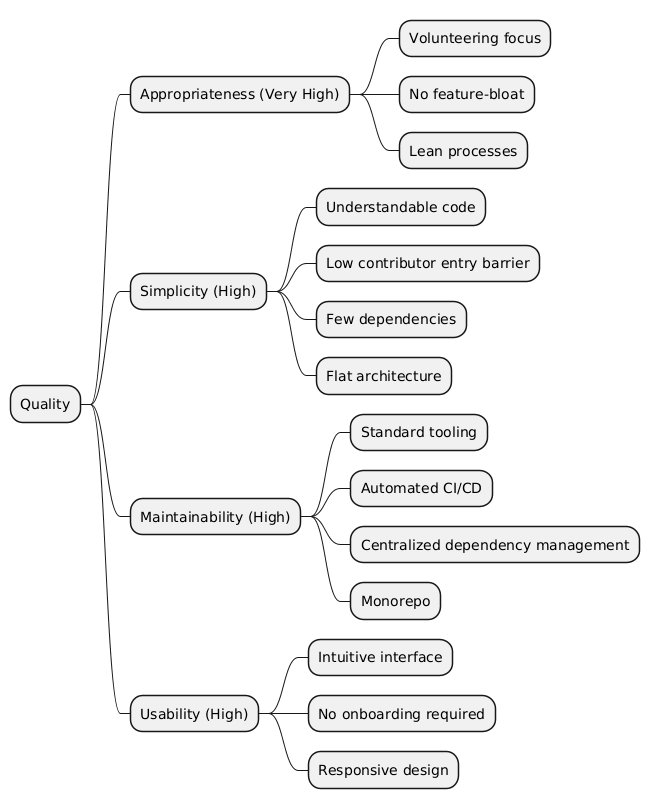
10.3. Quality Scenarios
10.3.1. Appropriateness
| ID | Scenario | Notes |
|---|---|---|
QS-1.1 |
A new feature is proposed. |
Before implementation, it is evaluated whether the feature concretely increases value for volunteers or organizations. Features without a clear connection to volunteering are rejected. |
QS-1.2 |
The architecture is to be extended with a new abstraction layer. |
The extension is only implemented if it addresses a concrete, current need - not for hypothetical future requirements. |
10.3.2. Simplicity
| ID | Scenario | Notes |
|---|---|---|
QS-2.1 |
A new contributor wants to make their first code contribution. |
The person can understand the code without deep prior knowledge and make a first contribution within a day. The |
QS-2.2 |
A new feature is to be implemented. |
The change can be made without understanding the entire system. The affected component is clearly bounded. |
QS-2.3 |
A contributor reads the source code of a component for the first time. |
Through flat hierarchies, few abstraction levels, and clear naming, the code is understandable without additional documentation. |
10.3.3. Maintainability
| ID | Scenario | Notes |
|---|---|---|
QS-3.1 |
A dependency version update is due. |
Through centralized dependency management ( |
QS-3.2 |
A CI build fails. |
The error message is clear and understandable without contextual knowledge. The root cause can be narrowed down quickly. |
QS-3.3 |
A new person takes over maintenance of the project. |
Through standard tooling, automated pipelines, and the monorepo structure, onboarding into maintenance is possible without extensive training. |
QS-3.4 |
A contributor opens a pull request. |
The backend CI quality gate ( |
10.3.4. Usability
| ID | Scenario | Notes |
|---|---|---|
QS-4.1 |
An organization wants to post a volunteer opportunity for the first time. |
The process is possible without training or a manual and is completed within a few minutes. |
QS-4.2 |
A volunteer searches for opportunities in their area. |
The search returns relevant results with a clear presentation of What, Where, and When - without an overloaded interface. |
11. Risks and Technical Debt
The following table lists the relevant risks and technical debts. Each risk or technical debt links to the corresponding Technical Debt Record (TDR) with full context. The No. column is a stable, chronological record identifier; the Severity column carries the prioritization (which risks the team is most uncomfortable with).
| No. | Context | Description | Severity | Status | Date | TDR |
|---|---|---|---|---|---|---|
1 |
Rate Limiting |
Missing rate limitation. |
Medium |
Resolved |
2026-05-03 |
|
2 |
CI Pipeline Performance |
Steadily growing backend CI pipeline dominated by end-to-end tests; a 2026-08-20 re-measurement found a 21 min 58 s median wall-clock and a 36.4% completion rate (53% of |
High |
In Progress |
2026-08-20 |
|
3 |
Shared Staging/Production Host |
Staging and production shared one host with no isolation between a release-candidate deploy and real traffic. Overtaken by #2165 (ADR-7) moving all deployment out of this repository’s scope entirely, so the underlying risk is no longer this repository’s to track. |
Medium |
Resolved |
2026-08-22 |
12. Glossary
12.1. Domain Terms
These are the terms the domain model in Cross-cutting Concepts is built from. They are the vocabulary used in code, in the UI and in this document; where a German UI string differs from the code identifier, both are given.
| Term | Definition |
|---|---|
Achievement |
A badge a volunteer unlocks, of type |
Audit Log |
Append-only record of an administrative action: who acted, what action, on which subject, and optionally why. Written whenever a platform admin disables, restores or changes an account, organization or listing. Readable only by admins. |
Check-in |
Confirmation that a volunteer actually showed up. The organizer chooses the method per opportunity: |
Engagement |
A volunteer’s sign-up for one volunteer opportunity, and the record of how it went: |
Feedback |
A rating and optional comment a volunteer leaves on a completed engagement, editable for a limited window after submission. |
Invitation |
An organizer’s offer to a user to join an organization with an intended role. Expires after 14 days if not accepted or declined. |
Meeting |
An appointment the organizer and a volunteer arrange after an |
Membership |
The link between a user and an organization, carrying the member’s role ( |
Notification |
An in-app message in a user’s inbox, generated from a domain event (a sign-up arrived, an invitation was accepted, an opportunity you signed up for changed). The backend sends no email for any of them (ADR-15); the only emails are Keycloak’s own account emails. |
Occurrence |
Whether an opportunity happens once ( |
Organization |
A club, NGO, or other entity that posts volunteer opportunities on the platform. |
Organizer |
A user with the |
Participation Type |
How a volunteer takes part: |
Platform Admin |
A user with the |
Report |
An abuse report filed by a user against an opportunity, an organization or another user. Moves from |
Shadow Delete |
An admin action that makes an account, organization or listing invisible to everyone else without destroying its data, so it can be restored. Distinct from a volunteer deleting their own account, which anonymizes their engagements permanently. |
Streak |
Counters tracking a volunteer’s sustained activity: consecutive login days and consecutive active weeks, plus a total of confirmed engagements. Feeds the streak achievements. |
Time Slot |
One concrete shift within a volunteer opportunity: start, end, and an optional participant cap. Slots created by one recurring request share a series ID. |
Volunteer |
A user who searches for and signs up for volunteer opportunities. Test persona: Vera ( |
Volunteer Opportunity |
A concrete request for help posted by an organization. Describes what is needed, where, when, and what skills are required. Central aggregate of the domain; moves through |
12.2. Technical Terms
| Term | Definition |
|---|---|
ADR |
Architecture Decision Record. A document that captures a significant architectural decision including its context, the decision itself, the rationale, considered alternatives, and consequences. ADRs are stored under |
Aggregate |
A cluster of domain objects treated as one consistency boundary, with a single root entity as its only entry point. |
AGPL |
GNU Affero General Public License. The open-source license under which Afunto is released. Derivative works - including those offered as network services - must be released under the same license. |
arc42 |
A template for documenting software and system architectures, structured into 12 chapters. Widely used in German-speaking countries. See https://arc42.org. |
Aspire (.NET Aspire) |
.NET’s local orchestration framework. The AppHost project provisions PostgreSQL, pgAdmin, Keycloak, RustFS, Mailpit, the backend API, and the Vite frontend with a single |
CQRS |
Command Query Responsibility Segregation. An architectural pattern that separates read operations (queries) from write operations (commands). |
Domain Event |
A record that something business-relevant happened, raised by an aggregate and dispatched after the transaction commits. How modules react to each other without referencing each other - see Cross-cutting Concepts under Module Structure. |
EF Core |
Entity Framework Core. The ORM (Object-Relational Mapper) used in the backend to interact with PostgreSQL. Manages the database schema via migrations. |
GHCR |
GitHub Container Registry. The Docker image registry used to publish the frontend, backend, and Keycloak images on version releases. |
IAM |
Identity and Access Management. The discipline of managing who users are (authentication) and what they are allowed to do (authorization). Handled by Keycloak in Afunto. |
JWKS |
JSON Web Key Set. A published set of public keys from Keycloak used by the backend to verify JWT signatures without contacting Keycloak on every request. |
JWT |
JSON Web Token. A signed, compact token format used to carry authentication and authorization claims. The backend validates the JWT’s signature against Keycloak’s public JWKS keys on every request. |
Keycloak |
An open-source Identity and Access Management server. Used in Afunto for user authentication (OIDC), user management, and role-based access control. |
Mediator (ISender) |
The application’s small in-house CQRS dispatcher ( |
Module |
A functional building block of the backend, cut by business function and repeated as a folder in |
NSwag |
A .NET toolchain for generating API clients from OpenAPI specifications. Here it generates exactly one artefact: the integration tests' C# client ( |
OIDC |
OpenID Connect. An identity layer built on top of OAuth 2.0. Used for the authentication flow between the frontend, Keycloak, and the backend. |
OTLP |
OpenTelemetry Protocol. The wire format the backend exports logs, metrics and traces in - collected by the Aspire dashboard locally, and by whatever collector |
Outbox |
A database table domain events are written to inside the same transaction as the state change that raised them, then dispatched by a background job. Guarantees an event is never lost or emitted for a rolled-back change. |
PKCE |
Proof Key for Code Exchange. An extension to the OAuth 2.0 Authorization Code Flow that prevents authorization code interception attacks. Required for public clients (SPAs) where a client secret cannot be kept confidential. |
Shared Kernel |
The cross-module code every module depends on: message dispatch, |
TDR |
Technical Debt Record. Captures a known technical debt or risk with its context, impact, severity, and proposed mitigation. Stored under |
Value Object |
A domain object identified by its values rather than an ID, immutable once created. |